CSE Under grad. || Trying to be a better developer each day || Consistency is the key
Introduction
While using Git we mostly run commands like -
git add .
git commit -m "done"
git push
but you should know how things are done inside git , where do they keep the changes…
So instead of memorizing commands , let’s just understand what is git doing internally.
How Git Works Internally
Git is not just a tool that stores the versions, it more like a tracking system which
takes snapshots of your project when ever you make changes -
stores it in the database
uses hashing to connect everything
Now lets talk about the `.git` folder-
This is like the brain of the repository.
when you do-
git init
It creates a hidden folder : .git
and this is the inside structure of the folder -
.git/
├── objects/      <-- Git’s database which keeps -(blobs, trees, commits)
├── refs/         <-- Branch pointers (main, feature etc.)
├── HEAD          <-- Tells where you currently are
├── index         <-- Staging area (very important)
├── logs/         <-- History of HEAD movement
└── config        <-- Repo settings
But what are all these folders, lets talk about them one by one -
Objects:
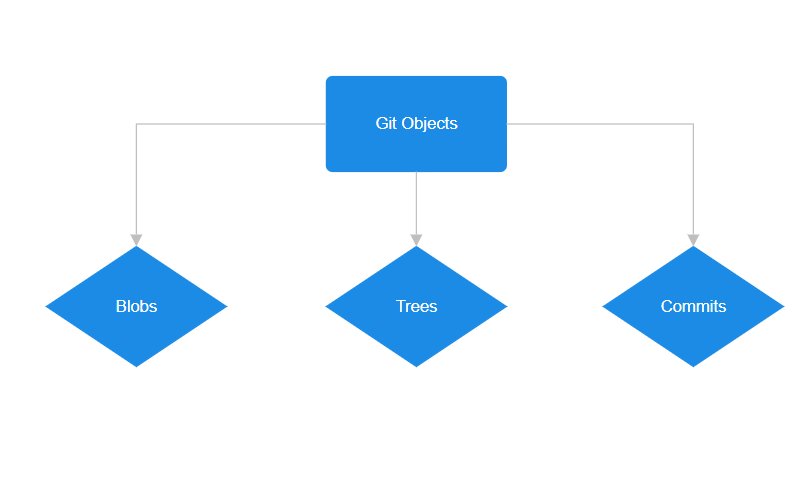
Git objects are fundamental units of storage in Git, representing various elements like commits, trees (directories), and blobs (file contents) .These objects are immutable and form the backbone of Git's version control system.
refs :
that stores references (refs), which are human-readable pointers to specific commits in your repository's history. Branches and tags are the most common examples of these references.
Head:
it is a symbolic reference that points to the current commit you have checked out in your working directory
Index:
The Git "index" (also known as the staging area) is where you prepare changes for your next commit.
logs:
contains the history of the Head movement .
config:
it configuration settings are stored here in plain-text files at three different levels: local (per repository), global (per user), and system (per machine).
Understanding of the Git Objects:
Internally Git stores everything as an object .
these are the three major ones-
Blob Object :
A Git blob is a snapshot of a file's content without metadata, identified by a unique SHA-1 hash.
It captures the file's state at a specific time and remains immutable once created. Blobs are the fundamental units in Git's version control system, stored in the repository based on their content hashes.
Modifying a file creates a new blob, maintaining the integrity of the version history within Git.
Tree Object :
A Git tree is like a folder in a file system, organizing blobs (files) and sub-trees (subdirectories).
It stores references to blobs and sub-trees along with metadata like file names and permissions.
The SHA-1 hash of a tree considers both its content and structure, ensuring integrity and hierarchy.
Trees maintain the repository's structure, aiding in the organized storage and retrieval of files and directories.
Commit Object:
A Git commit captures a snapshot of the project's state at a specific time. It includes metadata such as author details, timestamp, and a descriptive message.
Each commit references the root tree, representing the project's files and directories at that moment.
Commit objects also link to parent commits, forming a chronological history of changes.
Commits are checkpoints in the project's history, enabling change tracking, version control, and collaboration.
They are essential for branching, merging, and maintaining the project's integrity and history.
Relations between these three objects :
Commit
  |
  v
Tree (folder structure)
  |
  +----> Blob (file1 content)
  |
  +----> Blob (file2 content)
So actually ,Commit doesn’t store your files directly
Commit stores a Tree & Tree points to BLOBS
And commits also connect with history:
Commit2 -----> Parent Commit1
How Git Tracks Changes
Git tracks changes by:
it stores file content as blobs
it uses hashes to identify content
it creates new objects only when something changes
That means:
If a file stays same → Git reuses old blob
If file changes → Git creates a new blob
So it is very efficient.
Git works using three zones:
Working Directory
Your normal project folder where you write code.
Staging Area (Index)
A preparation area for commit.
Repository (Commits stored inside .git)
Final saved history.
So your code moves like this:
Working Directory ---> Staging Area ---> Repository
What Happens Internally During : git add
When you run:
git add file.txt
Git does these internal steps:
it reads the file content & creates a blob object for it. then stores it in .git/objects/ & updates .git/index (staging area)
What Happens Internally During : git commit
When you run:
git commit -m "my commit"
git takes all staged blobs from index & creates a tree object (folder structure).then creates a commit object pointing to that tree & moves branch pointer main to new commit. After that git moves HEAD to the latest commit
So internally:
git add→ makes blobs + staging readygit commit→ makes tree + commit snapshot
Flow becomes:
git add  -> blob stored + index updated
git commit -> tree + commit created + HEAD moved
So Ultimately git add and git commit behaves like :
Working Directory
     |
     |  git add
     v
Staging Area (index)
     |
     |  git commit
     v
Repository (.git/objects)
How Git Uses Hashes
Git uses hashes (like SHA-1 or SHA-256 depending on config) to generate a unique ID.
if you’ve seen commit IDs like:
e7a1c9f2b8... That long ID is not any random id . It represents the content of the object.
Hash means: “Address of content”
Same content → same hash & Different content → different hash
That’s why Git is super reliable:
it prevents corruption, ensures integrity, avoids duplicates & makes history trusty.